Key Takeaways
- 1. stdio exchanges MCP messages through a local server process's standard input and output streams.
- 2. Streamable HTTP carries MCP messages over HTTP, making it suitable for remote server deployments.
- 3. Neither transport is universally better; the right choice depends on where the server runs and who needs to access it.
- 4. Both approaches require thoughtful error handling, compatibility testing, and security controls appropriate to the deployment.
- 5. Remote deployments need particular attention to authentication, network exposure, and request validation.
Introduction
Choosing the right transport affects how an AI application connects to its tools, handles communication, and operates in development or production. The Model Context Protocol (MCP) supports different ways for clients and servers to exchange messages, with stdio commonly suited to local integrations and Streamable HTTP designed for remote connectivity.
Understanding mcp transport protocols helps developers select an architecture that fits their deployment environment, security requirements, and scaling needs. The decision is not simply about speed: it also involves process management, network access, authentication, operational complexity, and compatibility with the MCP client.
The key principle is straightforward: use stdio when a client can launch and manage a local server process; consider Streamable HTTP when the server needs to be accessed as a network service by remote clients.
What Is an MCP Transport, and Why Does It Matter?
An MCP transport defines how messages travel between an MCP client and an MCP server. It handles message delivery and framing, while the protocol defines the meaning of requests, responses, and notifications. The official MCP transport specification describes stdio and Streamable HTTP as standard transport options.
How Does stdio Transport Work?
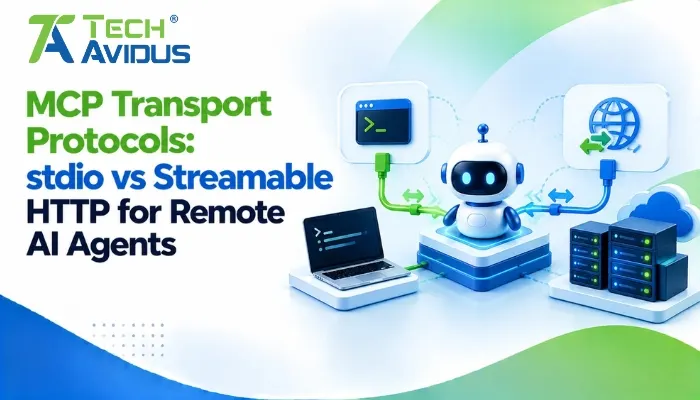
stdio is a local communication method in which the client launches the MCP server as a subprocess and exchanges messages through standard input (stdin) and standard output (stdout).
- Local process communication: The client starts the server and sends protocol messages through its input stream. The server returns messages through its output stream, while diagnostic logs should go to standard error (stderr) so they do not corrupt protocol messages.
- Simple local setup: This approach works well for developer tools, desktop AI applications, and integrations that run alongside the client. It usually avoids the need to expose a network endpoint, although the server process and its local permissions still need appropriate controls.
stdio is a strong fit when a single application manages the server's lifecycle. It is less convenient when multiple remote applications need to connect to a centrally hosted service.
How Does Streamable HTTP Work?
Streamable HTTP uses HTTP requests to carry protocol messages between a client and a server operating as a network-accessible service. Depending on the specification revision and implementation, responses may be returned as JSON or streamed using Server-Sent Events (SSE).
- Remote access: A client connects to the server through an HTTP endpoint instead of launching a local process. This makes it suitable for hosted integrations, centralized services, and applications running on different machines.
- Deployment flexibility: HTTP infrastructure can support TLS, authentication middleware, gateways, monitoring, and load balancing. These benefits depend on correct configuration; using HTTP alone does not make a server secure or automatically scalable.
For new deployments, check the specification version supported by both client and server. MCP transport behavior has evolved, so older tutorials and SDK examples may describe session handling or streaming behavior that differs from newer implementations.
stdio vs. Streamable HTTP: Which Should You Choose?
The practical difference is that stdio connects a client to a locally launched process, while Streamable HTTP connects a client to a server over a network. Choose based on deployment needs rather than assuming one transport is always faster or better.
Choose stdio when:
- Your integration runs locally: For example, a coding assistant can launch a local MCP server that reads project files or invokes approved development tools. Keeping the server local can simplify setup when remote access is unnecessary.
- You want straightforward process management: The client can start and stop the server as needed. This is useful for development workflows, but teams must still manage dependencies, environment variables, process failures, and access to local files.
Choose Streamable HTTP when:
- Multiple clients need a shared service: A company might host an MCP server that connects an AI assistant to internal documentation or business systems. Authorized clients can connect over the network without each running its own server process.
- You need centralized operations: A hosted service can integrate with monitoring, deployment pipelines, access policies, and network controls. Teams must plan for authentication, timeouts, concurrency, availability, and version compatibility.
Neither option guarantees better latency or reliability in every environment. Measure actual response times and failure behavior under realistic workloads before making performance claims.
Advantages and Limitations of Each Transport
Both approaches support MCP communication, but they introduce different operational considerations.
stdio: Benefits and trade-offs
- Advantages: Local communication can be straightforward to configure, and the client can manage the server process directly. It is useful for personal development tools and integrations that do not require remote access.
- Limitations: Each client may need its own server process and local configuration. Managing shared access, centralized deployment, and remote availability can require a different architecture.
Streamable HTTP: Benefits and trade-offs
- Advantages: A hosted endpoint can serve authorized clients across different machines and integrate with standard web infrastructure. Centralized deployment can also make updates and monitoring easier to manage.
- Limitations: Network connectivity introduces additional failure points, and remote access requires careful security configuration. Proxy behavior, request timeouts, authentication, and compatibility between protocol versions must be tested.
Real-World Example: Connecting an AI Agent to Business Systems
Imagine a company building an AI assistant that answers questions about inventory and order status.
During early development, engineers might use stdio to connect the assistant to a local test server. They can inspect messages, adjust tool definitions, and debug errors without exposing the service to a network.
When the integration needs to support users across a web application, the team could deploy a Streamable HTTP server. The hosted service would authenticate clients, validate requests, call the appropriate business APIs, and return structured results.
Before launch, the team should test concurrent requests, expired credentials, unavailable downstream APIs, and network interruptions. If the server can modify orders or inventory, the application should also enforce permissions and approval rules for consequential actions.
This scenario illustrates a common architectural path, not a requirement to migrate from one transport to another. A local deployment may remain the right choice if remote access is never needed.

Best Practices for Implementing MCP Transports
Reliable transport implementation depends on disciplined configuration, security, and testing.
- Verify compatibility first: Check the protocol revision and transport features supported by the client, server SDK, and deployment environment. Avoid copying older configuration examples without confirming that their behavior matches your implementation.
- Secure network endpoints: For remote services, use appropriate authentication and authorization, protect traffic with TLS, validate incoming requests, and restrict network exposure. Follow the relevant specification's security requirements, including origin validation where applicable.
- Keep stdio output clean: Send diagnostic logs to stderr rather than stdout, which carries protocol messages. Validate startup behavior, process termination, and error reporting so that debugging does not break communication.
- Design for failures: Handle timeouts, dropped connections, malformed responses, and downstream service errors. Use bounded retries only where safe, particularly when an operation could change external state.
- Test real workloads: Measure latency, throughput, resource consumption, and recovery behavior under representative conditions. Confirm that cancellation, authentication renewal, and concurrent access behave as expected for your selected transport and specification revision.
Recap: How Should You Select an MCP Transport?
stdio is generally suited to local MCP integrations where a client launches and manages the server process. Streamable HTTP is generally suited to network-accessible services that need to support remote clients.
The decision should be based on deployment location, access requirements, security boundaries, operational needs, and client compatibility. Developers should verify the supported protocol revision and test the complete integration before production deployment.
For teams that need help choosing, implementing, or securing the right MCP transport for their use case, explore our MCP Server Development service.
Conclusion
Selecting a transport is an architectural decision that affects how an AI agent connects to external capabilities, how the integration is deployed, and how it is secured.
Start with your actual requirements: use stdio for suitable local integrations and consider Streamable HTTP for remote services. Verify protocol compatibility, test realistic failure scenarios, and implement security controls before expanding the integration.
.jpg "Savan Surani")
Savan Surani
Savan Surani is an expert in MCP (Model Context Protocol) Server Development, specializing in building secure, scalable, and efficient solutions that connect AI models with external tools, APIs, and data sources. He focuses on developing custom MCP servers, streamlining AI integrations, and enabling seamless communication between AI applications and business systems. With a strong focus on automation, system interoperability, and reliable architecture, Savan helps businesses build intelligent, connected, and scalable AI-powered solutions.