Key Takeaways
- 1. The client manages communication. It connects an AI application to an MCP server and handles protocol-level interactions.
- 2. The server exposes capabilities. It makes supported tools, resources, and prompts available to connected clients.
- 3. The host coordinates the experience. The AI application containing the model and user interface typically acts as the host.
- 4. One application can use multiple servers. Different servers can provide access to databases, internal APIs, files, or other services.
- 5. Security applies to both sides. Authentication, permissions, input validation, and careful handling of tool results remain essential.
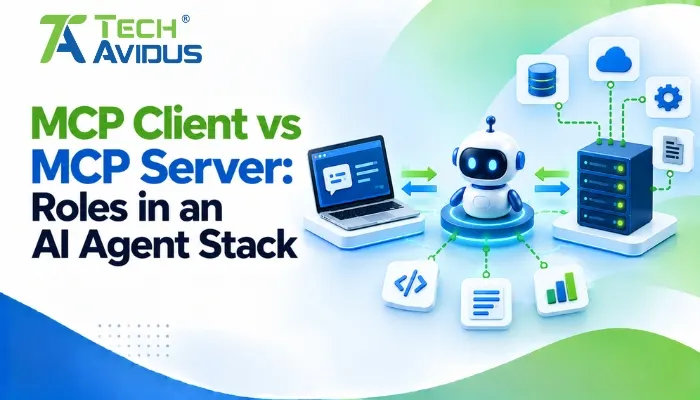
Understanding the difference between an MCP client and an MCP server helps developers design AI applications that connect to external tools, business data, and services. Although these components work together, they have different responsibilities: one manages communication with a server, while the other exposes capabilities that an AI application can use.
For teams building AI assistants, knowing how these roles fit into the architecture makes integrations easier to plan, test, and secure.
What Is an MCP Client?
An MCP client is the component inside an AI application that maintains communication with a specific MCP server. It sends protocol requests, receives responses, and helps the host application access the server’s available capabilities.
In practical implementations, the client handles communication details so developers do not need to build a separate, custom integration for every AI model and external service.
What does the client actually do?
- Establishes communication with a server. Depending on the implementation and transport, the client connects to a local process or a remote endpoint and follows the protocol’s communication rules.
- Discovers available capabilities. It can request information about supported tools, resources, and prompts so the host can determine which capabilities are available.
- Sends requests and processes responses. When an AI workflow needs external information or an action, the client passes the appropriate request to the server and returns the result to the host.
- Maintains separation between integrations. A host typically creates a separate client for each server connection. This helps isolate integrations and makes it easier to manage access independently.
What Is an MCP Server?
An MCP server is a program that exposes selected tools, data, or reusable prompts through a standardized interface. It acts as the integration layer between an AI application and the system or service providing those capabilities.
A server might connect to a database, retrieve files, access a project-management system, or provide a controlled interface to a business API.

What does the server actually do?
- Exposes tools for actions. A server may offer a tool to search support tickets, retrieve an order, or create a task. The server validates requests and executes the permitted operation.
- Provides resources for context. Resources can make relevant information available to the AI application, such as documentation, database schema details, or selected records.
- Offers reusable prompts. A server can provide prompt templates for common workflows, helping applications use consistent instructions for supported tasks.
- Enforces integration boundaries. The server should expose only the operations and data that the application is authorized to access. Sensitive actions require appropriate permission checks and validation.
For example, an internal CRM server could expose a customer-search tool without giving an AI application unrestricted access to the entire CRM database.
MCP Client vs MCP Server: Key Differences
The key difference is that the client communicates with a server, while the server provides the capabilities being requested. They are complementary components rather than competing alternatives.
Responsibility and location
The client generally lives within the host AI application, which coordinates model interaction and user experience. The server runs as a local process or remote service, depending on the integration.
Direction of communication
Clients commonly send requests to discover capabilities or invoke tools. Servers return results or errors and may also send supported notifications or request certain forms of input from the client.
Access to external systems
The client does not automatically receive unrestricted access to a database or API. Instead, the server defines the operations it exposes and should enforce the required permissions before performing them.
Scaling and maintenance
A host can connect to multiple servers through separate clients. This allows teams to add integrations for different systems without putting every integration into one large server, although each additional connection brings configuration, testing, and security considerations.
How Does the Host Fit into the Architecture?
The host is the AI application that coordinates the model, user interaction, and one or more client connections. It is an important third component that should not be confused with either the client or server.
Consider an AI assistant that needs to search company documentation and retrieve customer information. The host can manage two clients: one connected to a documentation server and another connected to a CRM server.
Each client communicates with its corresponding server, while the host combines the results and presents an answer to the user. The model does not need to manage each transport connection directly.
For the current architecture and implementation details, refer to the official Model Context Protocol architecture documentation.
How Does an MCP Client Communicate with a Server?
The communication flow generally follows a simple pattern, although the exact message sequence depends on the protocol version and implementation.
1. Connection and capability discovery. The client establishes communication with the server and determines which protocol features and capabilities are supported.
2. Capability selection. The host and model use the available information to identify a suitable tool, resource, or prompt for the task.
3. Request execution. The client sends a structured request, such as a tool invocation with validated arguments, to the server.
4. Result handling. The server performs the permitted operation and returns a result or an error. The host then decides how to use that response in the broader AI workflow.
MCP uses JSON-RPC-based messages and supports transports such as standard input/output (studio) and Streamable HTTP. The appropriate choice depends on whether the server runs locally or needs to serve remote clients.
Advantages and Limitations
This architecture makes integrations more modular, but it does not eliminate the engineering work required to make them reliable.
Advantages
- Reusable integrations. A server can expose a consistent interface for supported operations, reducing the need to create a completely different integration for every compatible host.
- Clear separation of responsibilities. The host coordinates the AI experience, the client handles protocol communication, and the server provides the integration capabilities.
- Flexible connectivity. Teams can connect local tools and remote business systems using supported transports, depending on their deployment requirements.
Limitations
- Security still requires careful design. Standardized communication does not guarantee safe access. Authentication, authorization, input validation, and user confirmation for sensitive operations may all be necessary.
- Integration quality depends on implementation. Poorly designed tools, vague descriptions, unreliable APIs, and inconsistent error handling can still lead to failed workflows.
- Multiple connections add operational complexity. Each server may have its own credentials, availability requirements, permissions, and version compatibility considerations.

An Illustrative Real-World Workflow
Imagine a support team building an AI assistant that answers order-status questions and creates follow-up tasks.
The host coordinates the conversation. One client connects to an order-management server, while another connects to a task-management server. The first server exposes a controlled order lookup tool; the second provides a tool for creating follow-up tasks.
When a customer asks about a delayed order, the assistant can retrieve the order status through the first integration. If follow-up is needed, the host can request confirmation before invoking the task-creation tool through the second integration.
This example illustrates why the roles matter: clients provide the communication path, servers expose specific operations, and the host coordinates the overall workflow. Production implementations must still verify identity, limit access to customer data, and handle failed or unauthorized requests safely.
Best Practices for Reliable Implementations
- Keep server capabilities focused. Expose clear, narrowly scoped tools instead of giving an integration broad access to unrelated systems. This makes permissions easier to review and tool behavior easier to test.
- Validate requests at the server boundary. Check argument types, required fields, user permissions, and business rules before executing operations. Never assume that a request is safe simply because it came through a trusted host.
- Choose the transport for the deployment environment. Stdio can suit local process integrations, while Streamable HTTP supports remote connectivity. Configure authentication and network access according to the server's exposure.
- Design for errors and observability. Return useful error information without leaking secrets, and log relevant operational events. Monitor timeouts, failed requests, and upstream API problems.
- Test the complete workflow. Test capability discovery, tool execution, permission failures, unavailable services, malformed arguments, and unexpected responses. A successful connection alone does not prove the integration works reliably.
- Review changes before deployment. When server capabilities or connected APIs change, reassess access controls and run regression tests to ensure existing workflows still behave as expected.
Recap: How Do the Components Work Together?
An MCP client manages communication between an AI host and a specific MCP server. An MCP server exposes tools, resources, and prompts that the host can use through that client. The host coordinates model interaction and manages multiple integrations when needed.
The client is responsible for protocol communication, while the server is responsible for providing and protecting its exposed capabilities. Together, these components enable modular AI integrations without removing the need for careful security, testing, and monitoring.
For businesses building reliable AI integrations with external tools and data, MCP Server Development can help create secure, scalable MCP servers tailored to specific application requirements.
Conclusion
Understanding the client, server, and host helps developers build AI integrations with clearer responsibilities and fewer tightly coupled connections. Start by identifying the systems your AI application needs to access, then define the smallest set of server capabilities required to support those workflows.
If you are planning a custom integration, book a free consultation with Techavidus to discuss your requirements, architecture, and implementation approach.
.jpg "Savan Surani")
Savan Surani
Savan Surani is an expert in MCP (Model Context Protocol) Server Development, specializing in building secure, scalable, and efficient solutions that connect AI models with external tools, APIs, and data sources. He focuses on developing custom MCP servers, streamlining AI integrations, and enabling seamless communication between AI applications and business systems. With a strong focus on automation, system interoperability, and reliable architecture, Savan helps businesses build intelligent, connected, and scalable AI-powered solutions.